2024年2月
开着tshark喝茶
早上开着tshark排查线上问题,然后看了几篇blog,突然收到一个内存告警。
我嘞个去,赶紧ctrl+c停止抓包。
查看监控图形。好险。cpu烧了30%,内存烧了15GB,swap也开始用了。


不过还好有一些效果,该节点连接后端redis的一个接口重传次数多。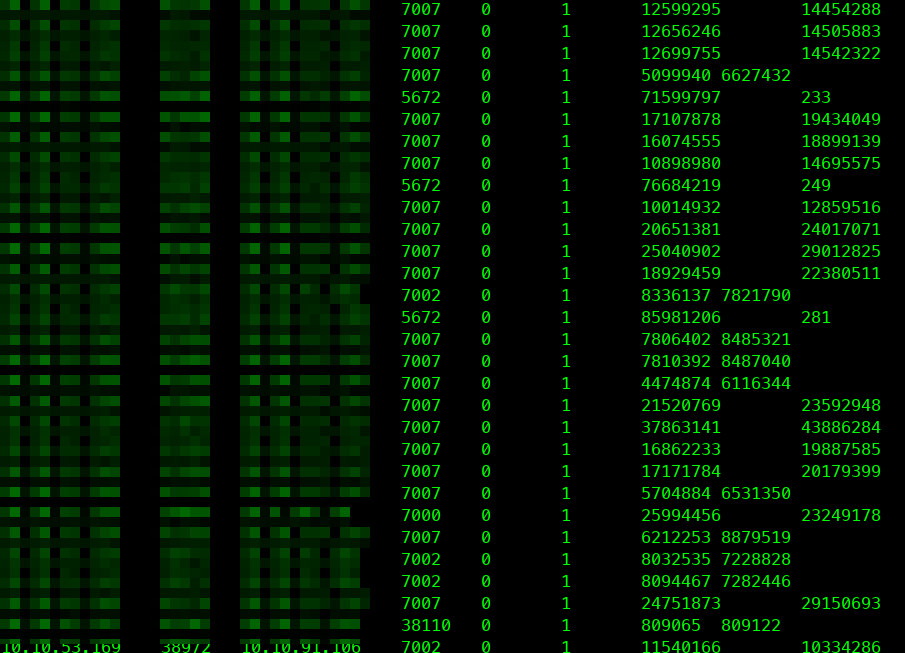
一次由tcp timeouts引发的持续两周的排查
一、背景
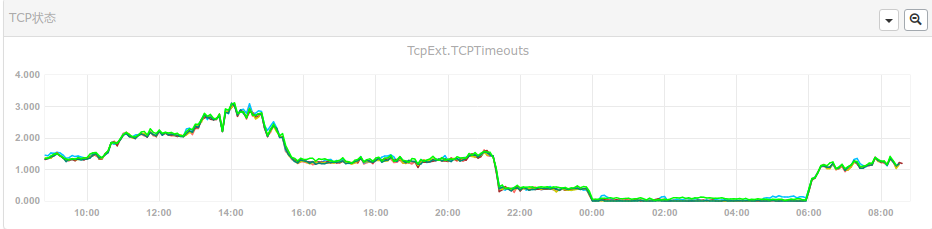
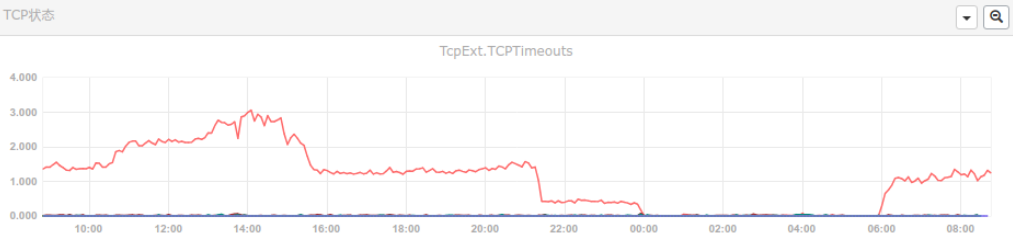
看监控看多了之后,就容易对一些细小的指标感兴趣。这不,以下两张图片展示了一批功能不同的服务器,发生了tcp timeouts。
二、理论依据
- TCP超时(TCP timeouts):
TCP超时是指在TCP连接建立或数据传输过程中,如果一方在规定的时间内没有收到对方的确认或其他响应,就会触发超时机制。
当TCP超时发生时,通常会重新发送之前未得到确认的数据包,以确保数据的可靠传输。
- TCP重传(TCP retransmissions):
TCP重传是指在发送端未收到对端确认的情况下,会重新发送之前发送的数据包。
TCP重传通常会在TCP超时后触发,以确保数据的可靠传输。
- TCP中止(TCP abort):
TCP中止是指在某些情况下终止TCP连接的过程。
TCP中止可能是由于超时次数达到上限、连接出现严重错误、或者用户主动关闭连接等原因引起的。
三、排查过程
3.1 使用tshark抓包
tshark -i eth0 -Y "tcp.analysis.retransmission" -T fields -e ip.src -e tcp.srcport -e ip.dst -e tcp.dstport -e tcp.flags.syn -e tcp.flags.ack -e tcp.seq -e tcp.ack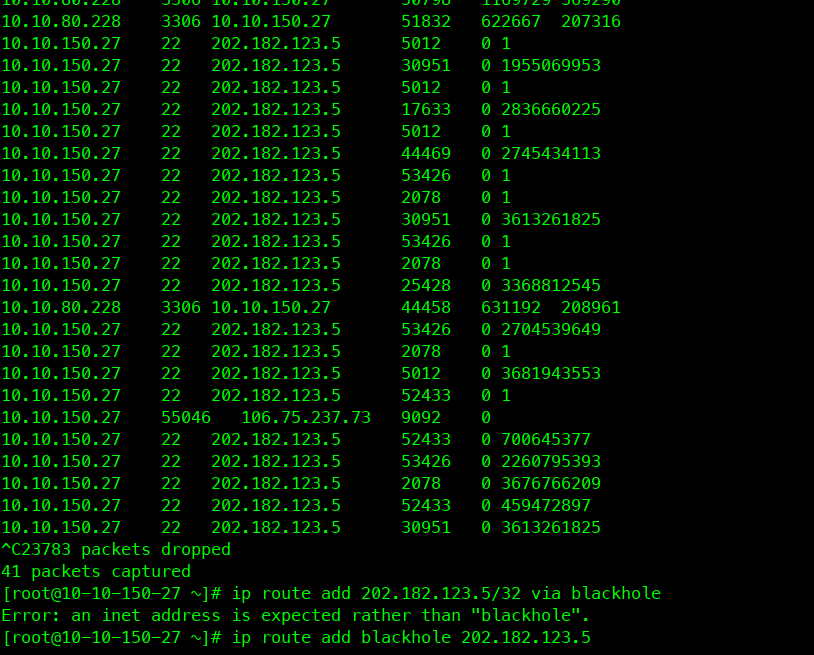
从上图可以看出,有一些22端口的流量。难道是有人探测?
安装fail2ban保护服务器。后来发现,tcp timeouts还是有。
于是在云主机的外网防火墙,封禁22端口。效果不错。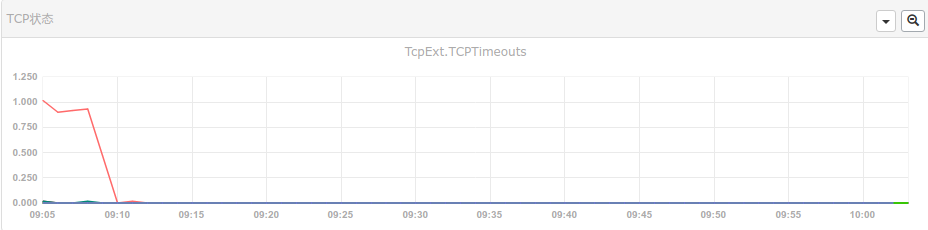
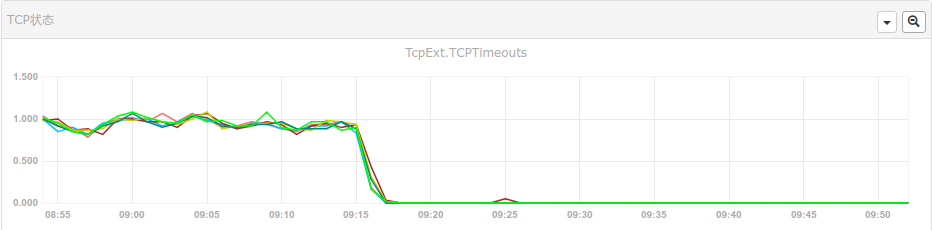
此时,tshark抓包遇到了另外两个问题。
3.2 问题一 内网调用网外网服务
这个问题是由于内网服务去调用外网服务,而外网服务已经不用了。所以存在有没有删除的代码逻辑还在调用旧接口。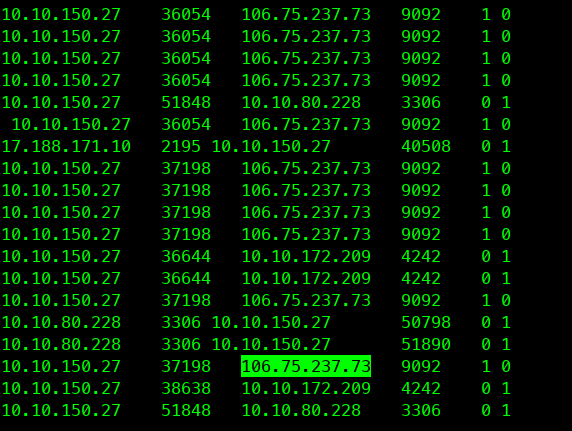
通过使用conntrack命令拿到云主机上哪个ip地址在连接
使用脚本
#!/bin/bash

# Get all running container IDs
container_ids=$(docker ps -q)

for id in $container_ids
do
  # Get container name
  name=$(docker ps --format '{{.Names}}' -f id=$id)

  # Get container image
  image=$(docker ps --format '{{.Image}}' -f id=$id)

  # Get container IP
  ip=$(docker inspect -f '{{range .NetworkSettings.Networks}}{{.IPAddress}}{{end}}' $id)

  echo "ID: $id"
  echo "Name: $name"
  echo "Image: $image"
  echo "IP: $ip"
  echo "-------------------------"
done
查看信息,最终锁定了容器名称,等待交付研发。
3.3 问题二 长连接服务始终有tcp retrans
这种情况,可能跟业务场景有关系。好多物联网设备,低功耗的,网络延迟会大一些等等造成。也不算啥问题了。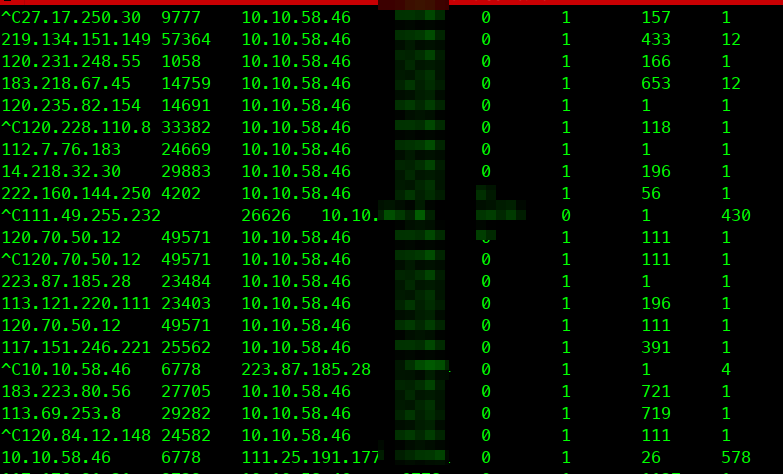
总结
- tcp的状态监测是评估业务运行状况重要的指标之一。
- 灵活运行tshark和conntrack可以辅助定位问题。
- 因为外网ssh 22端口密码探测导致的问题,可以使用开启防火墙拦截。
一个国外的小伙无法运行一个需要avx支持的vm
I'm running the PNET VM on a ESXi server that's setup on a HP Z800 12-Core Xeon 2x X5675 3.06GHz 96GB Ram 256GB SSD 4TB HDD PC. Could you kindly help me to identify where and which CPU you are referring to.
The Intel® Xeon® Processor X5675 does not support AVX (Advanced Vector Extensions). The X5675 is part of the Westmere-EP microarchitecture, which was introduced before AVX was implemented in Intel processors. AVX was first supported with the Sandy Bridge microarchitecture, which came after Westmere. Sandy Bridge-based Xeon processors, which started to become available in 2011, were the first Xeon processors to include support for AVX.
I checked the cpu Intel® Xeon® Processor X5675 specification. The cpu model does not support avx.
So, the vm under the esxi running on the cpu does not have the ability to running vm with avx support.
部署wireguard和wgdashboard在同一个容器内
背景
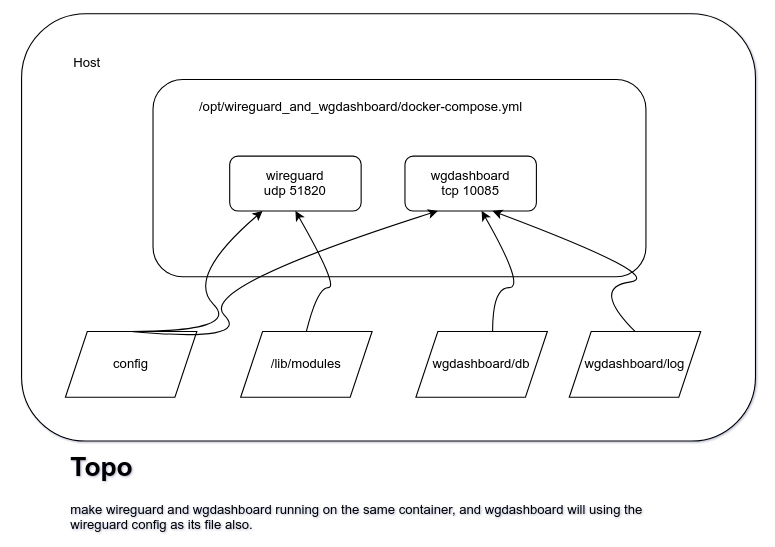
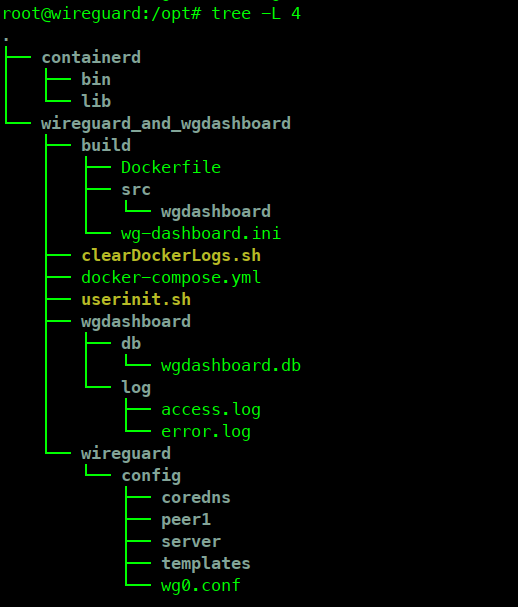
过程
目录
mkdir -p /opt/wireguard_and_wgdashboard
docker-compose文件
version: '3.3'
services:
  wireguard_and_wgdashboard:
    container_name: wireguard_and_wgdashboard
    image: harbor.test.stesh.cn/linuxserver/wireguard_and_wgdashboard:20240228
    privileged: true
    build:
      context: ./wgdashboard/src
      dockerfile: Dockerfile
    cap_add:
      - NET_ADMIN
      - SYS_MODULE
    sysctls:
      - "net.ipv4.conf.all.src_valid_mark=1"
    environment:
      - PUID=1000
      - PGID=1000
      - TZ=Asia/Shanghai
      - SERVERURL=192.168.124.164
      - SERVERPORT=51820
      - PEERS=1
      - PEERDNS=auto
      - INTERNAL_SUBNET=9.8.0.0
      - ALLOWEDIPS=0.0.0.0/0
      - PERSISTENTKEEPALIVE_PEERS=
      - LOG_CONFS=true
    networks:
      wireguard-network:
        ipv4_address: 172.18.0.12
    ports:
      - '51820:51820/udp'
      - '10086:10086/tcp'
    volumes:
      - './wireguard/config:/config'
      - '/lib/modules:/lib/modules'
      - './wgdashboard/db:/app/src/db'
      - './wgdashboard/log:/app/src/log'
    restart: always

networks:
  wireguard-network:
    driver: bridge
    ipam:
      config:
        - subnet: 172.18.0.0/24
Dockerfile
cat <<'EOF'>/opt/wireguard_and_wgdashboard/wgdashboard/src/Dockerfile
FROM harbor.test.stesh.cn/linuxserver/wireguard

COPY src/wgdashboard/ /app/
RUN mkdir /etc/s6-overlay/s6-rc.d/svc-wgdashboard/

RUN apk add --no-cache python3 py3-pip

RUN cd /app/src && \
    ls -al && \
    python3 -m pip install -U pip -i https://mirrors.ustc.edu.cn/pypi/web/simple  && \
    python3 -m pip install -U -r requirements.txt -i https://mirrors.ustc.edu.cn/pypi/web/simple

COPY wg-dashboard.ini /app/src/

EOF
文件修改
cat <<'EOF'>/opt/wireguard_and_wgdashboard/build/wg-dashboard.ini
[Account]
username=admin
password=xxx
[Server]
wg_conf_path=/config
app_ip=0.0.0.0
app_port=10086
auth_req=true
version=v3.0.6
dashboard_refresh_interval=60000
dashboard_sort=status
[Peers]
peer_global_dns=223.5.5.5
peer_endpoint_allowed_ip=0.0.0.0/0
peer_display_mode=grid
remote_endpoint=xxx
peer_mtu=1280
peer_keep_alive=21
EOF
系统路由等开机自启动命令
cat <<'EOF'>/root/userinit.sh
#!/bin/bash


ip rule delete fwmark 0x1 table 200
ip rule add fwmark 0x1 table 200

ip route delete default
ip route add default via 192.168.124.1 dev ens18 table 200
echo 1 > /proc/sys/net/ipv4/ip_forward

iptables -t mangle -F
iptables -t mangle -A PREROUTING -p udp --sport 51820 -j MARK --set-mark 1
iptables -t mangle -A OUTPUT -p udp --sport 51820 -j MARK --set-mark 1
cd /opt/ ; docker-compose up -d; sleep 3
docker exec wireguard_and_wgdashboard bash -c "cd /app/src; gunicorn --access-logfile log/access.log --error-logfile log/error.log 'dashboard:run_dashboard()'"

EOF

chmod a+x /root/init.sh

cat <<'EOF'>/etc/systemd/system/userinit.service
[Unit]
Description=userinit
Wants=network-online.target
After=network-online.target
[Service]
Type=simple
ExecStart=/opt/wireguard_and_wgdashboard/userinit.sh
[Install]
WantedBy=multi-user.target
EOF

sudo systemctl enable userinit.service
sudo systemctl start userinit.service
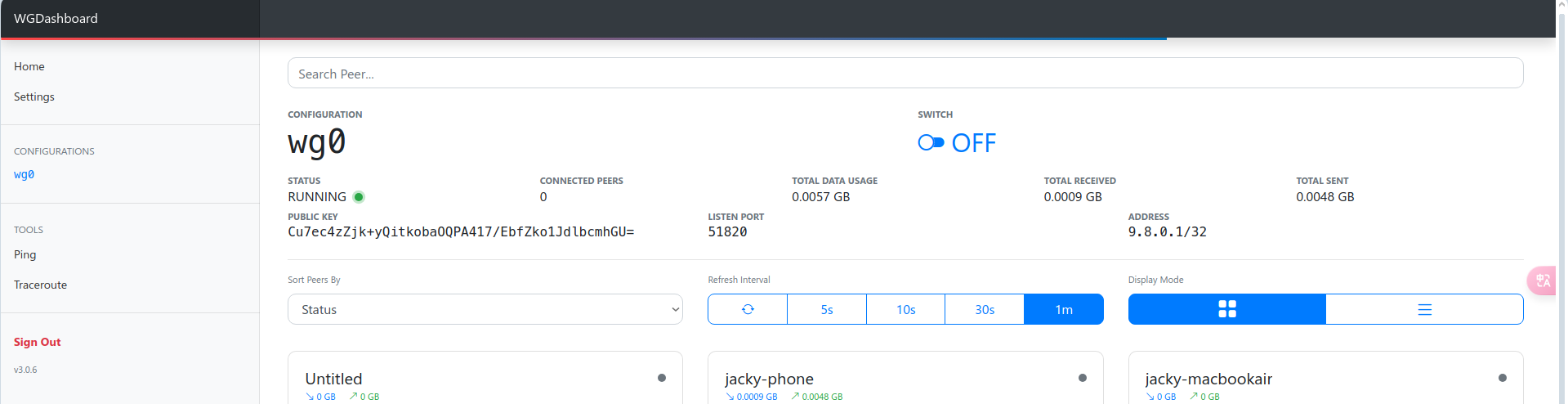
效果
参考
https://github.com/donaldzou/WGDashboard
https://www.wireguard.com/
部署xray 客户端,支持WG
一、简介
在过去相当长一段时间内,稳定的科学上网方法为使用国外部署shadowsocks+本地部署clash等技术实现本地socks代理,适用于浏览器等终端挂载使用。而对于操作系统,则可以通过设置系统全局代理或者设置终端http_proxy https_proxy socks_proxy all_proxy等参数也可以实现terminal终端等的使用,但是该方法受限于应用程序的支持程度不同导致现无法使用的情况。
无疑使我们想到了使用VPN的方式。其实早先,可以使用VPN协议直达国外网络,但是GFW对于VPN协议的识别和拦截程度相当严格,最终无法使用。近期,通过对Xray的研究,发现其对于iptables-tproxy的支持,可以实现透明代理。在局域网,可以通过设置网关为配置了iptables-tproxy的xray服务器。通过测试,也实现了从公网访问wg服务器,且wg服务器通过设置默认网关为Xray服务器,策略路由控制其udp 51820流量走默认网关,实现VPN科学上网。
拓扑图如下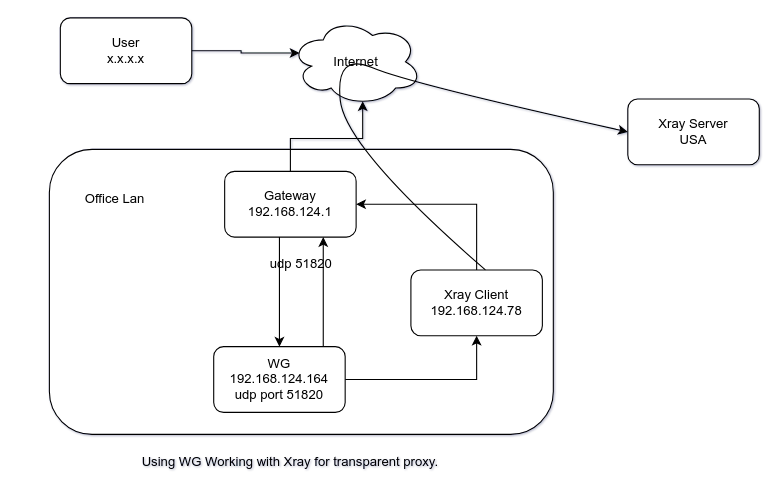
二、部署xray client systemd服务
2.1 下载文件
wget http://vip.123pan.cn/1815238395/download/xray/Xray-core%20v1.8.8/Xray-linux-64.zip
cp xray /usr/local/bin/
mkdir -p /usr/local/share/xray
wget --no-check-certificate -O /usr/local/share/xray/ http://vip.123pan.cn/1815238395/download/xray/rules/20240228/geoip.dat
wget --no-check-certificate -O /usr/local/share/xray/ http://vip.123pan.cn/1815238395/download/xray/rules/20240228/geosite.dat
2.2 配置服务
mkdir -p /etc/systemd/system/xray.service.d
cat <<'EOF'>10-donot_touch_single_conf.conf
# In case you have a good reason to do so, duplicate this file in the same directory and make your customizes there.
# Or all changes you made will be lost!  # Refer: https://www.freedesktop.org/software/systemd/man/systemd.unit.html
[Service]
ExecStart=
ExecStart=/usr/local/bin/xray run -config /usr/local/etc/xray/config.json

mkdir -p /etc/systemd/system/xray@.service.d/
cat <<'EOF'>10-donot_touch_single_conf.conf
# In case you have a good reason to do so, duplicate this file in the same directory and make your customizes there.
# Or all changes you made will be lost!  # Refer: https://www.freedesktop.org/software/systemd/man/systemd.unit.html
[Service]
ExecStart=
ExecStart=/usr/local/bin/xray run -config /usr/local/etc/xray/%i.json

cat <<'EOF'>/etc/systemd/system/xray.service
[Unit]
Description=Xray Service
Documentation=https://github.com/xtls
After=network.target nss-lookup.target
[Service]
User=nobody
CapabilityBoundingSet=CAP_NET_ADMIN CAP_NET_BIND_SERVICE
AmbientCapabilities=CAP_NET_ADMIN CAP_NET_BIND_SERVICE
NoNewPrivileges=true
ExecStart=/usr/local/bin/xray run -config /usr/local/etc/xray/config.json
Restart=on-failure
RestartPreventExitStatus=23
LimitNPROC=10000
LimitNOFILE=1000000
[Install]
WantedBy=multi-user.target
EOF

cat <<'EOF'>/etc/systemd/system/xray@.service
[Unit]
Description=Xray Service
Documentation=https://github.com/xtls
After=network.target nss-lookup.target
[Service]
User=nobody
CapabilityBoundingSet=CAP_NET_ADMIN CAP_NET_BIND_SERVICE
AmbientCapabilities=CAP_NET_ADMIN CAP_NET_BIND_SERVICE
NoNewPrivileges=true
ExecStart=/usr/local/bin/xray run -config /usr/local/etc/xray/%i.json
Restart=on-failure
RestartPreventExitStatus=23
LimitNPROC=10000
LimitNOFILE=1000000
[Install]
WantedBy=multi-user.target

chmod 644 /etc/systemd/system/xray.service /etc/systemd/system/xray@.service
2.3 配置xray client.json
cat <<'EOF'>/usr/local/etc/xray/config.json
{
  "log": {
    "loglevel": "warning"
  },
  "inbounds": [
    {
      "tag": "all-in",
      "port": 12345,
      "protocol": "dokodemo-door",
      "settings": {
        "network": "tcp,udp",
        "followRedirect": true
      },
      "sniffing": {
        "enabled": true,
        "destOverride": ["http", "tls", "quic"]
      },
      "streamSettings": {
        "sockopt": {
          "tproxy": "tproxy"
        }
      }
    },
    {
      "port": 10808,
      "protocol": "socks",
      "sniffing": {
        "enabled": true,
        "destOverride": ["http", "tls", "quic"]
      },
      "settings": {
        "auth": "noauth",
        "udp": true
      }
    }
  ],
  "outbounds": [
    {
      //此为默认outbound,路由(routing)模块若未匹配到任何规则,则默认走此 proxy 出口,如果你希望直连国内优先请将下面 direct 出口放到 outbound 第一,看不懂可忽略
      "tag": "proxy",
      "protocol": "vless",
      "settings": {
        "vnext": [
          {
            "address": "1111", //改为你自己的域名,直接填写ipv4或ipv6地址也可以
            "port": 443,
            "users": [
              {
                "id": "1111", //填写uuid,可通过在终端中输入 xray uuid 生成;此处也支持任意字符串(https://xtls.github.io/config/inbounds/vless.html#clientobject)
                "encryption": "none",
                "flow": "xtls-rprx-vision"
              }
            ]
          }
        ]
      },
      "streamSettings": {
        "sockopt": {
          "mark": 255
        },
        "network": "tcp",
        "security": "tls", //注意使用 xtls-rprx-vision 流控此处需为 tls
        "tlsSettings": {
          //注意使用 xtls-rprx-vision 流控此处需为 tlsSettings
          "allowInsecure": false,
          "serverName": "111", //改为你自己的域名
          "fingerprint": "chrome" //此设置建议先看下Release, https://github.com/XTLS/Xray-core/releases/tag/v1.7.3
        }
      }
    },
    {
      "tag": "direct",
      "protocol": "freedom",
      "settings": {
        "domainStrategy": "UseIP"
      },
      "streamSettings": {
        "sockopt": {
          "mark": 255
        }
      }
    },
    {
      "tag": "block",
      "protocol": "blackhole",
      "settings": {
        "response": {
          "type": "http"
        }
      }
    },
    {
      "tag": "dns-out",
      "protocol": "dns",
      "streamSettings": {
        "sockopt": {
          "mark": 255
        }
      }
    }
  ],
  "dns": {
    "hosts": {
      "domain:googleapis.cn": "googleapis.com",
      "dns.google": "8.8.8.8",
      "111": "111" //如果 outbound 的 proxy 里 address 填的域名:希望代理走ipv4,这里 VPS IP 填VPS的ipv4, 希望代理走ipv6,这里VPS IP 填VPS的ipv6;outbound 的 proxy 里 address 填的 IP,这行不用写。
    },
    "servers": [
      "https://1.1.1.1/dns-query",
      {
        "address": "119.29.29.29",
        "domains": ["geosite:cn"],
        "expectIPs": ["geoip:cn"]
      },
      "https://dns.google/dns-query",
      "223.5.5.5",
      "localhost"
    ]
  },
  "routing": {
    "domainMatcher": "mph",
    "domainStrategy": "IPIfNonMatch",
    "rules": [
      {
        "type": "field",
        "domain": ["geosite:category-ads-all"],
        "outboundTag": "block"
      },
      {
        "type": "field",
        "inboundTag": ["all-in"],
        "port": 123,
        "network": "udp",
        "outboundTag": "direct"
      },
      {
        "type": "field",
        "inboundTag": ["all-in"],
        "port": 53,
        "network": "udp",
        "outboundTag": "dns-out"
      },
      {
        "type": "field",
        "ip": ["119.29.29.29", "223.5.5.5"],
        "outboundTag": "direct"
      },
      {
        "type": "field",
        "protocol": ["bittorrent"],
        "outboundTag": "direct"
      },
      {
        "type": "field",
        "ip": ["geoip:private", "geoip:cn"], //此处可加入 VPS IP 避免 ssh 时被代理
        "outboundTag": "direct"
      },
      {
        "type": "field",
        "domain": ["geosite:cn"],
        "outboundTag": "direct"
      },
      {
        "type": "field",
        "ip": ["1.1.1.1", "8.8.8.8"],
        "outboundTag": "proxy"
      },
      {
        "type": "field",
        "domain": [
          "geosite:geolocation-!cn",
          "domain:googleapis.cn",
          "dns.google"
        ],
        "outboundTag": "proxy"
      }
    ]
  }
}
EOF
2.4 启动服务
systemctl enable xray
systemctl restart xray
2.5 设置支持流量转发到xray
#!/bin/bash

# 路由
ip rule delete fwmark 1 table 100
ip rule add fwmark 1 table 100

ip route flush table 100
ip route add local default dev lo table 100
ip route list table 100

# 代理局域网设备 v4
iptables -t mangle -N XRAY
iptables -t mangle -F XRAY
iptables -t mangle -A XRAY -p udp --dport 51820 -j RETURN
iptables -t mangle -A XRAY -p udp --sport 51820 -j RETURN
iptables -t mangle -A XRAY -d 127.0.0.1/32 -j RETURN
iptables -t mangle -A XRAY -d 224.0.0.0/4 -j RETURN
iptables -t mangle -A XRAY -d 255.255.255.255/32 -j RETURN
iptables -t mangle -A XRAY -d 192.168.0.0/16 -p tcp -j RETURN
iptables -t mangle -A XRAY -d 192.168.0.0/16 -p udp ! --dport 53 -j RETURN
iptables -t mangle -A XRAY -j RETURN -m mark --mark 0xff
iptables -t mangle -A XRAY -p udp -j TPROXY --on-ip 127.0.0.1 --on-port 12345 --tproxy-mark 1
iptables -t mangle -A XRAY -p tcp -j TPROXY --on-ip 127.0.0.1 --on-port 12345 --tproxy-mark 1
iptables -t mangle -A PREROUTING -j XRAY

# 代理网关本机 v4
iptables -t mangle -N XRAY_MASK
iptables -t mangle -F XRAY_MASK
iptables -t mangle -A XRAY_MASK -p udp --dport 51820 -j RETURN
iptables -t mangle -A XRAY_MASK -p udp --sport 51820 -j RETURN
iptables -t mangle -A XRAY_MASK -d 224.0.0.0/4 -j RETURN
iptables -t mangle -A XRAY_MASK -d 255.255.255.255/32 -j RETURN
iptables -t mangle -A XRAY_MASK -d 192.168.0.0/16 -p tcp -j RETURN
iptables -t mangle -A XRAY_MASK -d 192.168.0.0/16 -p udp ! --dport 53 -j RETURN
iptables -t mangle -A XRAY_MASK -j RETURN -m mark --mark 0xff
iptables -t mangle -A XRAY_MASK -p udp -j MARK --set-mark 1
iptables -t mangle -A XRAY_MASK -p tcp -j MARK --set-mark 1
iptables -t mangle -A OUTPUT -j XRAY_MASK

# 新建 DIVERT 规则,避免已有连接的包二次通过 TPROXY,理论上有一定的性能提升 v4
iptables -t mangle -N DIVERT
iptables -t mangle -F DIVERT
iptables -t mangle -A DIVERT -j MARK --set-mark 1
iptables -t mangle -A DIVERT -j ACCEPT
iptables -t mangle -I PREROUTING -p tcp -m socket -j DIVERT
三、支持WG
#!/bin/bash
ip rule add fwmark 0x1 table 200
ip route add default via 192.168.124.1 dev ens18 table 200
echo 1 > /proc/sys/net/ipv4/ip_forward

iptables -t mangle -F
iptables -t mangle -A PREROUTING -p udp --sport 51820 -j MARK --set-mark 1
iptables -t mangle -A OUTPUT -p udp --sport 51820 -j MARK --set-mark 1
四、参考
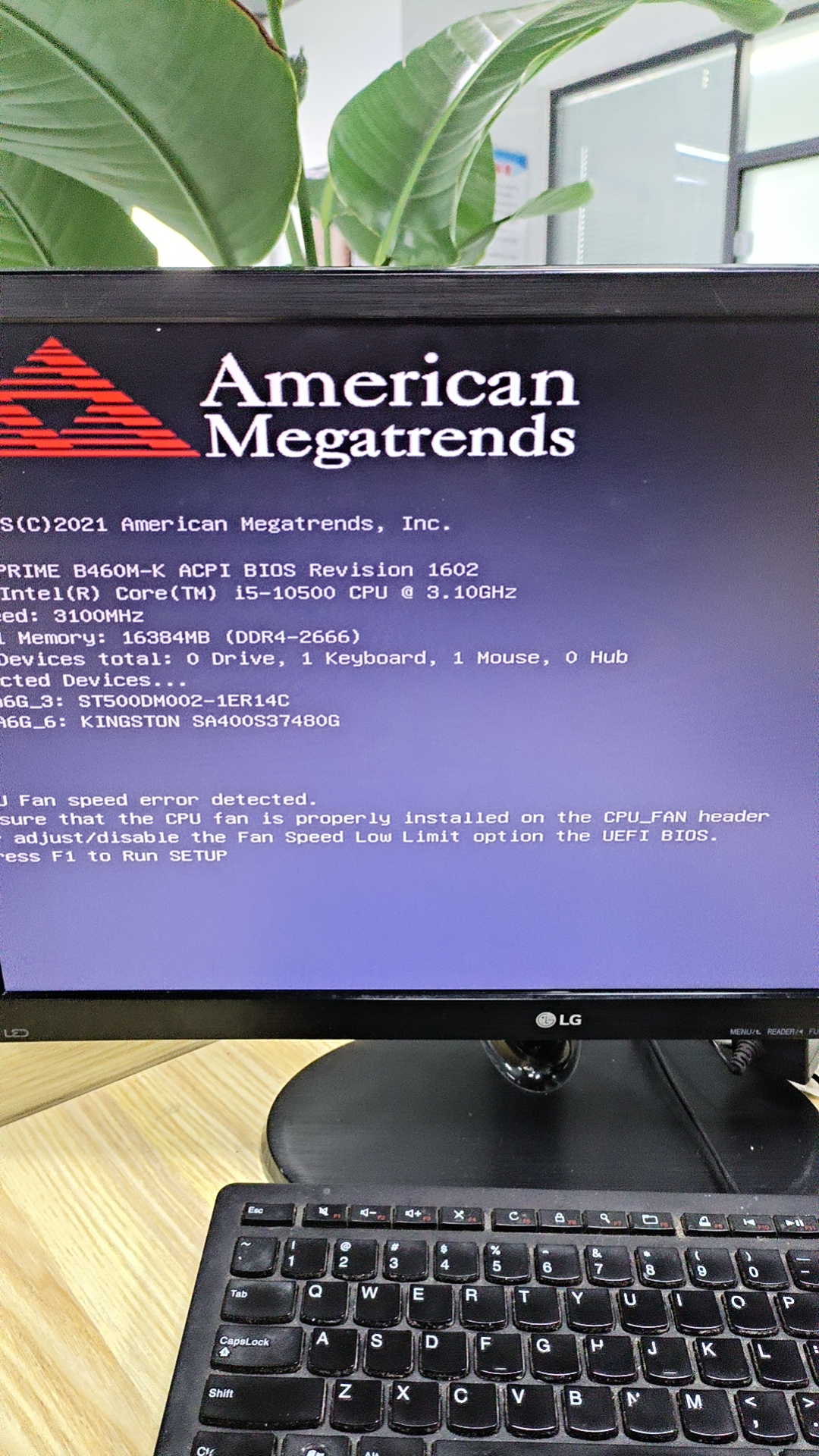
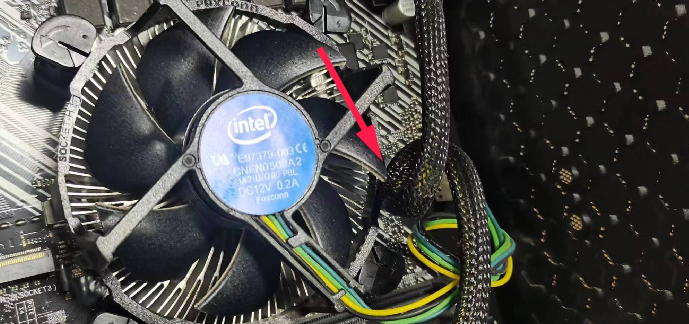
电脑风扇被排线挡住引起的无法正常运行